Encrypt Excel Files in Java
File encryption and decryption are essential for protecting sensitive business data. Excel workbooks often contain confidential information, making password protection a critical requirement. In this article we demonstrate how to encrypt or decrypt Excel files in Java using the powerful Aspose.Cells Java library. By following the examples, you’ll be able to add and remove workbook passwords programmatically.
The article covers these topics:
- Java Excel library Installation
- Encrypt Excel XLSX Files in Java
- Decrypt Excel XLSX Files Programmatically in Java
Java Excel library Installation
The Aspose.Cells Java library can be added to your project quickly via Maven or by downloading the JAR files directly. For detailed troubleshooting, refer to the official installation guide.
You can quickly install by either downloading the JAR files or adding the Maven configuration below:
<repository>
	<id>AsposeJavaAPI</id>
	<name>Aspose Java API</name>
	<url>https://repository.aspose.com/repo/</url>
</repository>
<dependency>
	<groupId>com.aspose</groupId>
	<artifactId>aspose-cells</artifactId>
	<version>22.6</version>
</dependency>
Encrypt Excel XLSX Files in Java
After adding the library, encrypt an Excel workbook with these steps:
- Create a Workbook object and load the target Excel file.
- Call the setPassword method to assign a password.
- Apply XOR encryption using the setEncryptionOptions method.
- Choose a strong encryption algorithm such as RC4 or Microsoft Strong Cryptographic Provider.
- Use the save method to write the encrypted workbook to disk.
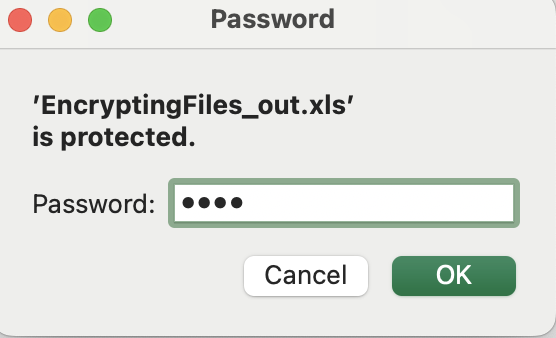
The result is shown below:
Decrypt Excel XLSX Files Programmatically in Java
You can remove password protection from an encrypted workbook using a few simple lines of code.
Follow these steps:
- Create a LoadOptions object to define loading parameters.
- Set the workbook password with loadOptions.setPassword.
- Instantiate a Workbook using the XLSX file and the configured load options.
- Call setPassword with a null value to clear the password.
- Save the workbook using the save method.
Get a Free License
You may obtain a free temporary license to try the API beyond evaluation limits.
Summing up
In this tutorial you learned how to programmatically encrypt and decrypt Excel files in Java using Aspose.Cells. Installing the Java Excel library enables you to secure workbooks automatically. Explore the full documentation for additional capabilities and stay updated via conholdate.com.
Ask a question
You can share your questions or queries on our forum.
FAQs
How do I password-protect an Excel file in Java?
Install this Java Excel API and use the provided methods to set a password on your Excel files programmatically.
How do I encrypt an XLSX file?
Call the setPassword method to encrypt the file. Explore the setEncryptionOptions class for additional encryption settings.
How do you decrypt a file in Java?
Use the loadOptions.setPassword method to open the encrypted file, then set the password to null to remove protection. See the full method list here.