PDF metadata includes essential fields such as title, author, subject, and keywords. The Extensible Metadata Platform (XMP) provides an XML‑based format for storing custom metadata as key/value pairs. With Java and Aspose.PDF for Java you can programmatically add, modify, or extract both standard document information and XMP metadata from PDF files. This guide demonstrates how to edit PDF properties and metadata using Java.
The following topics are covered:
- Java API to Edit PDF Properties and Metadata
- Edit PDF Properties using Java
- Read PDF Properties using Java
- Get XMP Metadata from a PDF File
- Set XMP Metadata in a PDF File
- Customize XMP Metadata Namespace in a PDF File
Java API to Edit PDF Properties and Metadata
To manipulate PDF properties and metadata, we use the Aspose.PDF for Java API8. This library enables generation, modification, conversion, rendering, security, and printing of supported documents without requiring Adobe Acrobat. Download the JAR file or include the following pom.xml snippet in your Maven‑based Java project.
<repository>
    <id>AsposeJavaAPI</id>
    <name>Aspose Java API</name>
    <url>https://repository.aspose.com/repo/</url>
</repository>
<dependency>
    <groupId>com.aspose</groupId>
    <artifactId>aspose-pdf</artifactId>
    <version>22.3</version>
</dependency>
Edit PDF Properties using Java
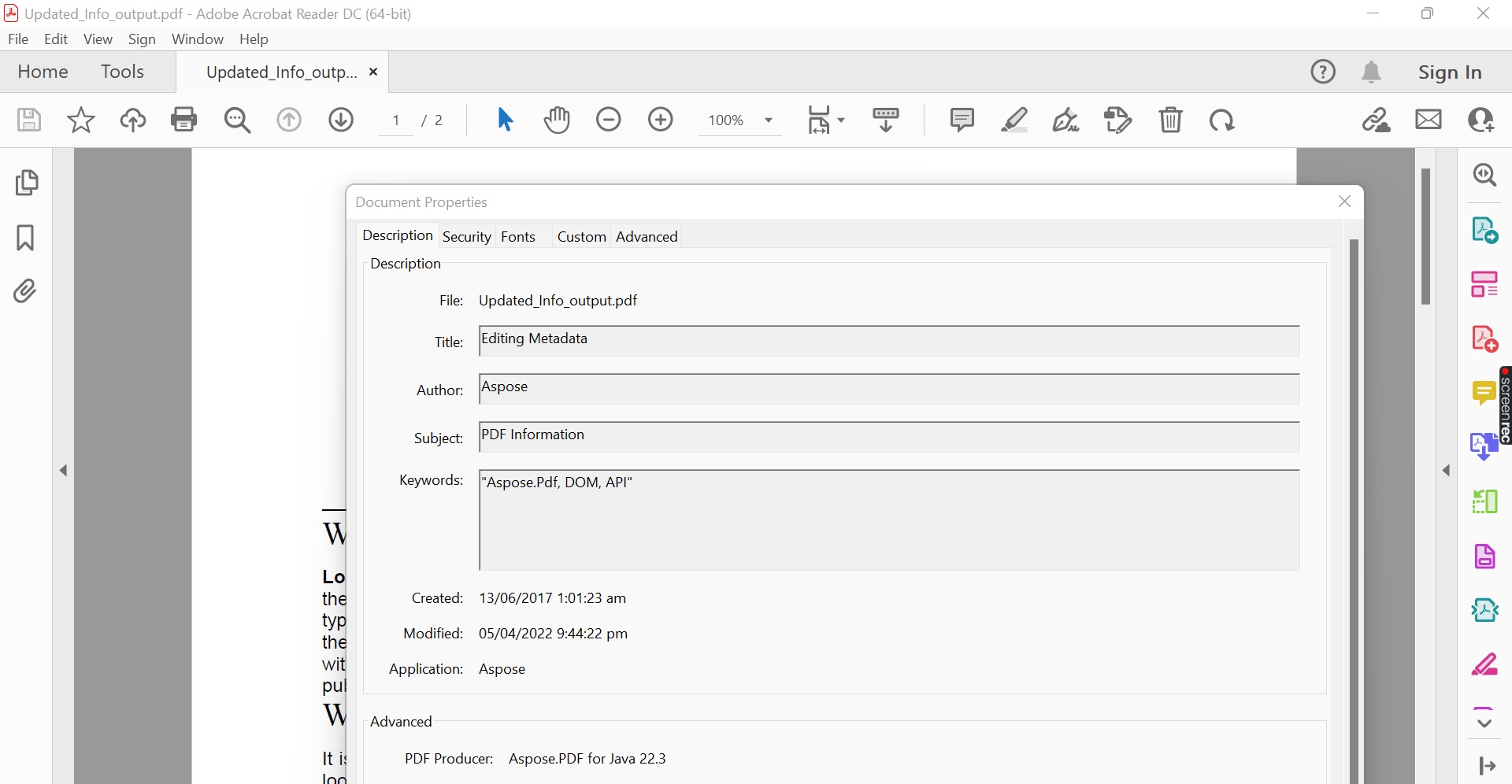
The PdfFileInfo class provides access to a PDF’s built‑in information dictionary. Follow these steps to update properties:
- Load a PDF document using the PdfFileInfo class.
- Set properties such as Author, Creator, Keywords, Subject, Title, etc.
- Save the PDF with the saveNewInfo() method, providing the output path.
The code sample below demonstrates how to edit meta properties of a PDF file using Java.
Edit Meta Properties of a PDF File in Java.
Read PDF Properties using Java
To extract basic PDF information:
- Load the PDF with the PdfFileInfo class.
- Access the meta properties and display them.
The following code shows how to get meta properties of a PDF file using Java.
Subject :PDF Information
Title :Editing Metadata
Keywords :Aspose.Pdf, DOM, API
Creator :Aspose
Creation Date :D:20170612160123-04'00'
Modification Date :D:20220405214422+05'00'
Is Valid PDF :true
Is Encrypted :false
Get XMP Metadata of a PDF File in Java
To read XMP metadata embedded in a PDF:
- Load the PDF using the Document class.
- Retrieve metadata with the get_Item() method of the Metadata class.
The code sample below shows how to get XMP metadata of a PDF file using Java.
xmp:CreateDate : 2022-04-05T10:05:24.4
xmp:Nickname : Nickname
xmp:CustomProperty : Custom Value
Set XMP Metadata in a PDF File in Java
To add or modify XMP metadata:
- Load the PDF with the Document class.
- Use the set_Item() method of the Metadata class to assign new values.
- Save the PDF using the Document.save() method.
The following code demonstrates how to set XMP metadata of a PDF file using Java.
Customize XMP Metadata Namespace in a PDF File
You can define a custom namespace URI instead of the default XMP specifications. Use the registerNamespaceUri method in the Metadata class. Follow these steps:
- Load the PDF with the Document class.
- Call registerNamespaceUri() with a prefix and namespace URI.
- Set metadata values using the set_Item() method.
- Save the PDF with Document.Save().
The code sample below shows how to set a custom metadata namespace in a PDF file using Java.
You can read the customized XMP metadata properties using the same approach as before.
NamespaceUri: http:// myown.xyz.com/xap/1.0/
myown:ModifyDate: 2022-04-05T10:18:45.9
myown:CreateDate: 2022-04-05T10:18:45.9
myown:DeveloperName: Developer Name
myown:MyProperty: My Custom Value
Get a Free API License
You can try the API without evaluation limits by requesting a free temporary license.
Conclusion
In this article we demonstrated how to:
- add or edit standard PDF information using Java;
- set and retrieve XMP metadata in a PDF file;
- define a custom metadata namespace URI with a chosen prefix.
For more details, see the Aspose.PDF for Java documentation. If you have questions, visit the forum.