Convert Image to JSON using C#
In a previous post we demonstrated how to convert an image to text with OCR in C#. This guide expands on that by showing how to convert an image directly to JSON using C#. By leveraging the enterprise‑grade .NET OCR API, you can quickly generate structured JSON that includes extracted text, layout information, and other image metadata.
The article covers:
- .NET OCR - C# API Installation
- How to Convert Image to JSON using C#
- Image to JSON Conversion in C# - Advanced Options
.NET OCR - C# API installation
The .NET OCR API installs easily and has no external dependencies. Choose one of the following methods:
- Download the DLLs directly from the official site – see the download link.
- Install via NuGet by running the command below in the Package Manager Console:
Install-Package Aspose.OCR
Both approaches add the required assemblies to your project, allowing immediate access to OCR functionality.
How to Convert Image to JSON using C#
The OCR library recognises scanned documents, screenshots, and a wide range of image formats. It can output both plain text and JSON representations of the recognized content.
Follow these steps to convert an image to JSON in a .NET C# application:
- Provide the image URL or local path.
- Instantiate the AsposeOcr class.
- Call RecognizeImageFromUri (or RecognizeImageFromFile) to perform OCR.
- Retrieve the RecognitionResult object.
- Use RecognitionSettings to fine‑tune language, layout, or preprocessing options.
- Access RecognitionText for raw text output (optional).
- Invoke GetJson on the result to obtain a fully‑structured JSON string.
Below is a concise code example that demonstrates the complete workflow:
The generated JSON output is illustrated in the following image:
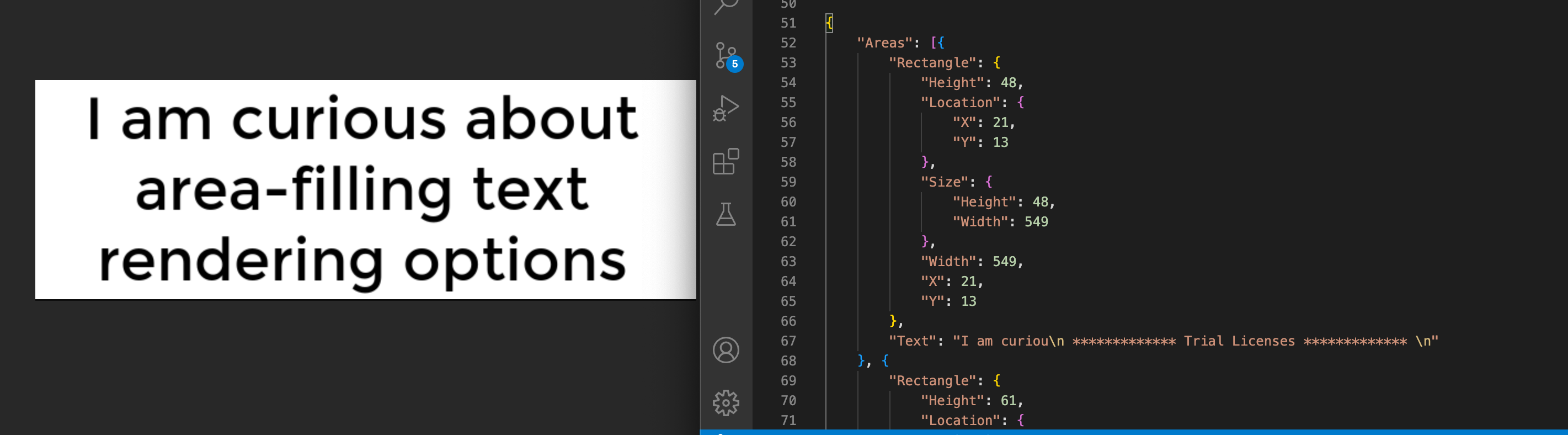
Image to JSON Conversion in C# - Advanced Options
The .NET OCR API includes several advanced features for image preprocessing and result customization. You can adjust brightness, contrast, despeckle noise, or apply deskew operations before recognition. Detailed guidance on these options is available here.
Get a Free License
A temporary free license lets you exceed the evaluation limits while testing the API. Request one from the free temporary license page.
Summing up
You now have a complete, programmatic solution for converting images to JSON in C# using the .NET OCR API. Explore the full documentation for additional scenarios, and check the GitHub repo for more code samples. Stay updated with the latest features on conholdate.com.
Ask a question
Post your questions or share feedback on our forum.
FAQs
Can we change an image to JSON?
Yes. The .NET OCR API provides dedicated methods to convert an image into a structured JSON format programmatically. See the documentation for implementation details.
How do you put an image file in a JSON object?
First, use RecognitionText to extract the image’s textual content, then call GetJson to wrap that text and related metadata into a JSON object.