When you work with multiple Excel workbooks (XLSX or XLS), consolidating them into a single file simplifies reporting and data management. Java developers can automate this process using Aspose.Cells for Java. This guide shows how to combine multiple Excel files into one workbook with Java.
The following topics are discussed in this article:
- Java API to Merge Excel Files
- Combine Multiple Excel Files into One using Java
- Combine Specific Worksheets of Multiple Excel Files into One using Java
- Merge Multiple Worksheets into One Worksheet using Java
- Consolidate Columns of Multiple Worksheets into One using Java
Java API to Merge Excel Files
To merge Excel workbooks programmatically, we use the Aspose.Cells for Java API. This library enables you to create, edit, convert, protect, and print spreadsheets without requiring Microsoft Excel, providing full Excel automation inside Java applications.
You can download the JAR file or add the following pom.xml configuration to a Maven‑based project and start using the code examples below.
<repository>
    <id>AsposeJavaAPI</id>
    <name>Aspose Java API</name>
    <url>https://repository.aspose.com/repo/</url>
</repository>
<dependency>
    <groupId>com.aspose</groupId>
    <artifactId>aspose-cells</artifactId>
    <version>21.8</version>
</dependency>
Java Combine Multiple Excel Files into One
Follow these steps to combine several Excel workbooks into a single file:
- Instantiate a Workbook object with the first source file.
- Instantiate a Workbook object with the second source file.
- Repeat step 2 for each additional source workbook.
- Call the combine() method on the first workbook, passing the next workbook instance.
- Continue calling combine() for each subsequent workbook.
- Save the merged result using the save() method of the Workbook class.
The code sample below demonstrates how to combine multiple Excel files into one workbook using Java.
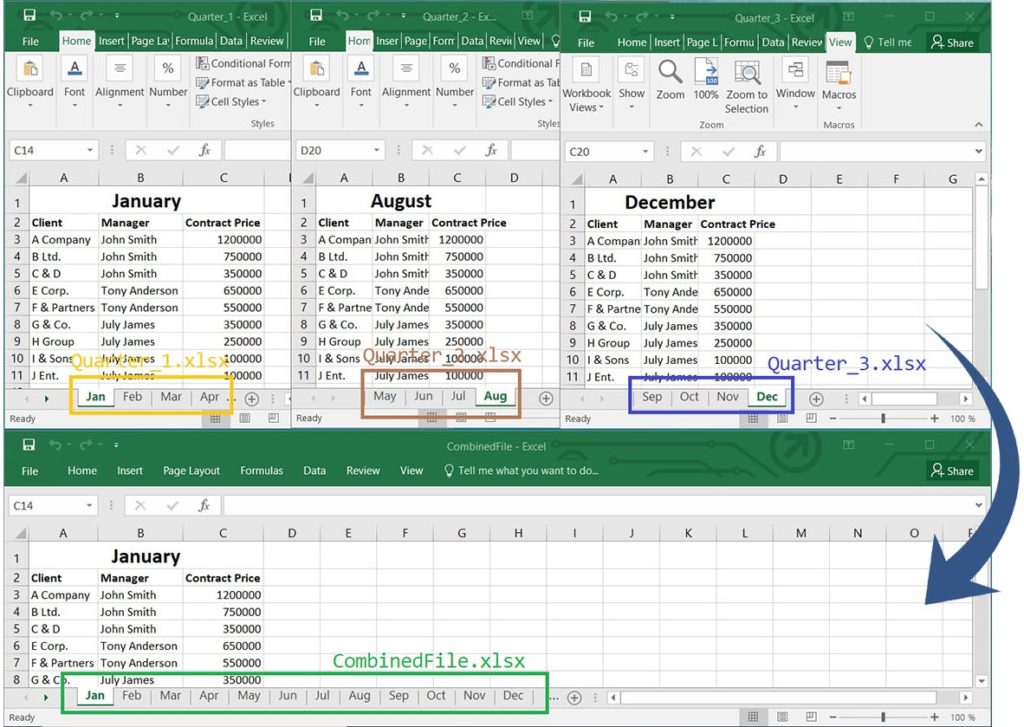
Combine Multiple Excel Files into One using Java
The Workbook class is the core object for handling Excel spreadsheets. It opens and saves native Excel formats and provides numerous properties and methods for manipulation. The combine() method merges the current workbook with another Workbook instance, while save() writes the final file to disk.
Combine Specific Worksheets of Multiple Excel Files into One - Java Guide
To extract selected worksheets from several workbooks and place them into a single destination workbook, use the following approach:
- Create a Workbook instance for source file 1.
- Create a Workbook instance for source file 2.
- Repeat for any additional source files.
- Create a Workbook instance that will serve as the destination file.
- Add new worksheets to the destination using the add() method of WorksheetCollection.
- Use the copy() method to copy a specific worksheet from source 1 to the destination.
- Repeat the copy() call for each worksheet you need from source 2 (and other sources).
- Rename the copied worksheets with setName() as required.
- Save the destination workbook via save().
The snippet below shows how to combine specific worksheets from multiple Excel files into one workbook using Java.
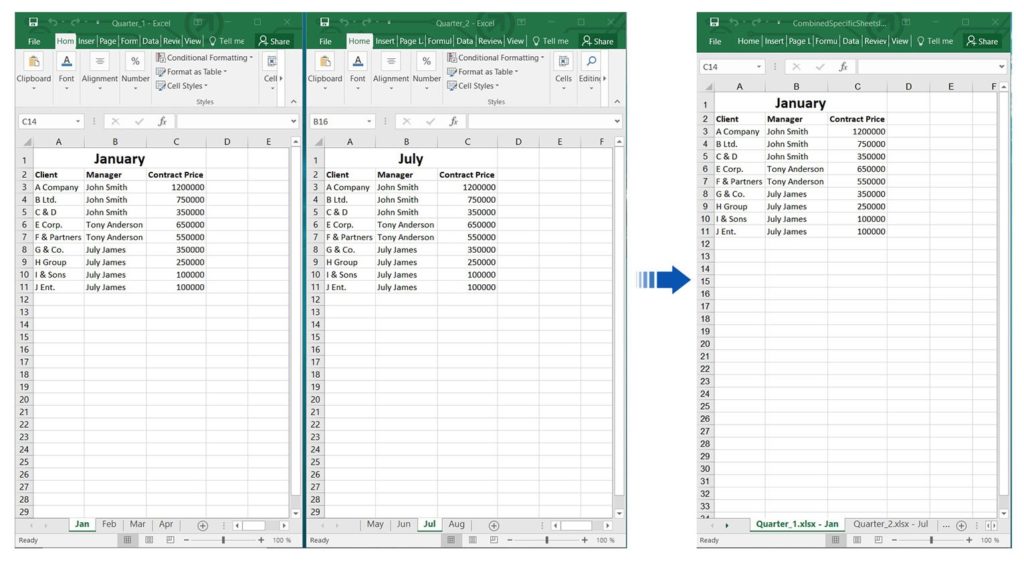
Combine Specific Worksheets of Multiple Excel Files into One using Java
The getWorksheets() property returns the collection of all worksheets in a workbook. You can add a new worksheet with add(), then copy content using copy(). The Worksheet class represents a single sheet and provides methods such as copy(), setName(), and getters for accessing worksheets by index or name.
Java Merge Multiple Worksheets into a Single Worksheet
To consolidate all worksheets of a workbook into one master worksheet, perform these steps:
- Open the source workbook with a Workbook instance.
- Add a new blank worksheet that will receive the merged data.
- Loop through each source worksheet and:
- Create a target range using createRange() (specify start row/column and size).
- Copy the source range into the target range with copy().
- Save the final workbook using save().
The following example illustrates how to merge multiple worksheets into a single worksheet using Java.
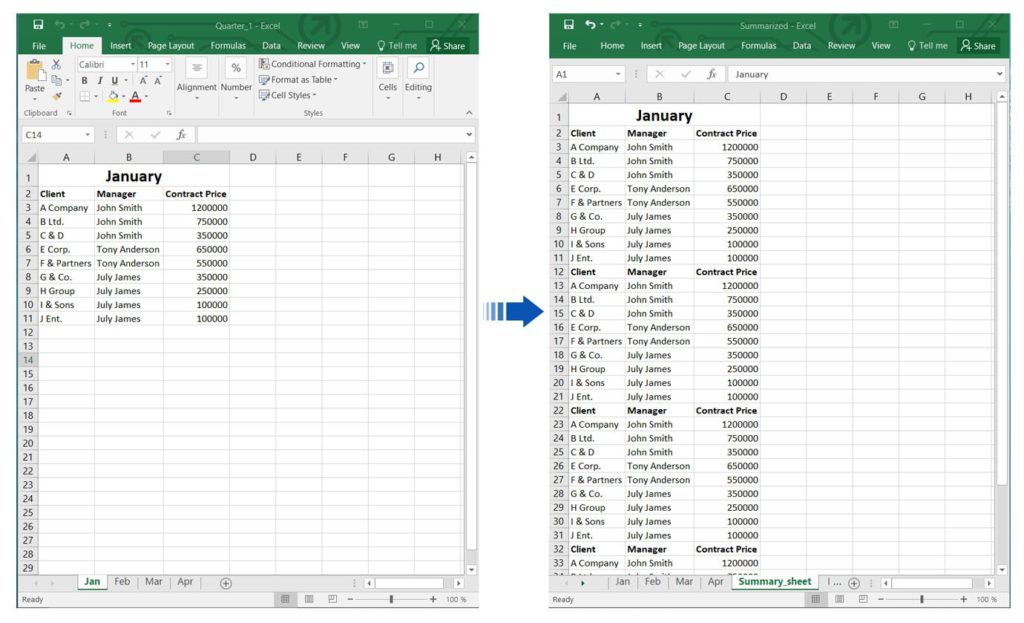
Merge Multiple Worksheets into One Worksheet using Java
The getCells() property of a worksheet provides access to its cell collection. The Cells class includes methods such as createRange() (multiple overloads) to define a block of cells, and copy() to transfer data, formatting, and formulas between ranges. The Range class represents a rectangular block of cells and supports copying of all content types.
Consolidate Columns of Multiple Worksheets into One using Java
To combine columns from several worksheets into a single worksheet, follow these steps:
- Open the source workbook with a Workbook instance.
- Add a new worksheet that will hold the consolidated columns.
- Iterate through each source worksheet and use copyColumn() to copy each column (by index) from the source to the destination.
- After processing all columns, save the workbook with save().
The code below demonstrates how to consolidate columns from multiple worksheets into one worksheet using Java.
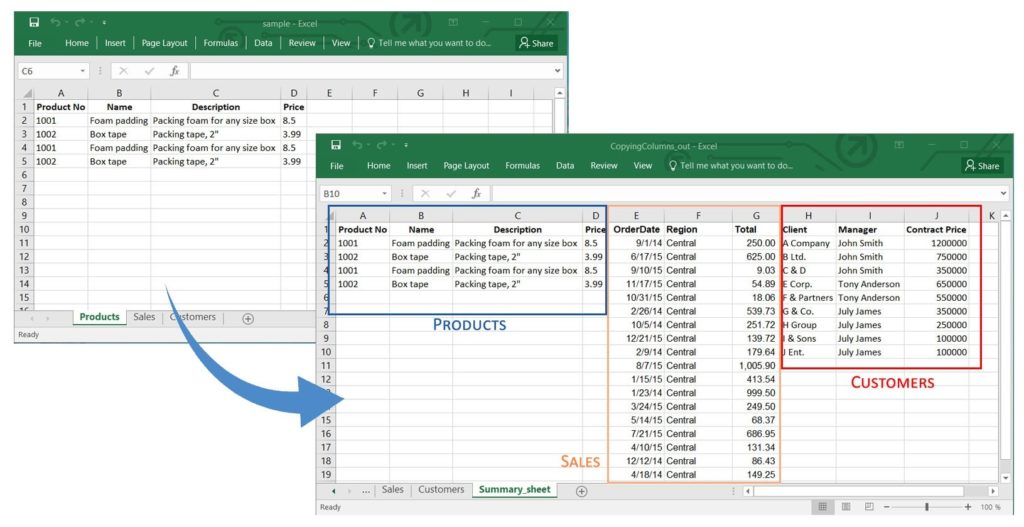
Consolidate Columns of Multiple Worksheets into One using Java
The getColumns() property returns the column collection for a worksheet. ColumnCollection manages individual Column objects, and copyColumn() copies an entire column’s data and formatting. Overloaded versions of copyColumn() allow you to specify paste options, source and destination column counts, and more.
Get a Free License
You can try the API without evaluation limitations by requesting a free temporary license.
Conclusion
In this article, you learned how to combine multiple Excel files into a single workbook using Aspose.Cells for Java. You also saw how to merge specific worksheets, consolidate all worksheets into one sheet, and combine columns from several worksheets. For more details, explore the Aspose.Cells for Java documentation or ask questions on the forum.