In this guide you will learn how to programmatically copy sheets from multiple Excel workbooks into a single workbook using C#, and how to merge data from several worksheets into one consolidated sheet. Follow the steps below to get started.
- Combine Multiple Excel Files into One using C#
- Combine Specific Worksheets of Excel Files into one Workbook
- Merge Multiple Worksheets into One using C#
C# API to Merge Multiple Excel files
Aspose.Cells for .NET is a powerful spreadsheet manipulation API that lets you create, edit, and process Excel files from within your .NET applications. You can either download the binaries of the API or install it via NuGet.
PM> Install-Package Aspose.Cells
Combine Multiple Excel Files into One using C#
Often you need to merge several Excel files into a single workbook, copying each worksheet from the source files into a destination workbook. Aspose.Cells supports all Excel versions, including Excel 97, 2003, 2010, 2016, and later.
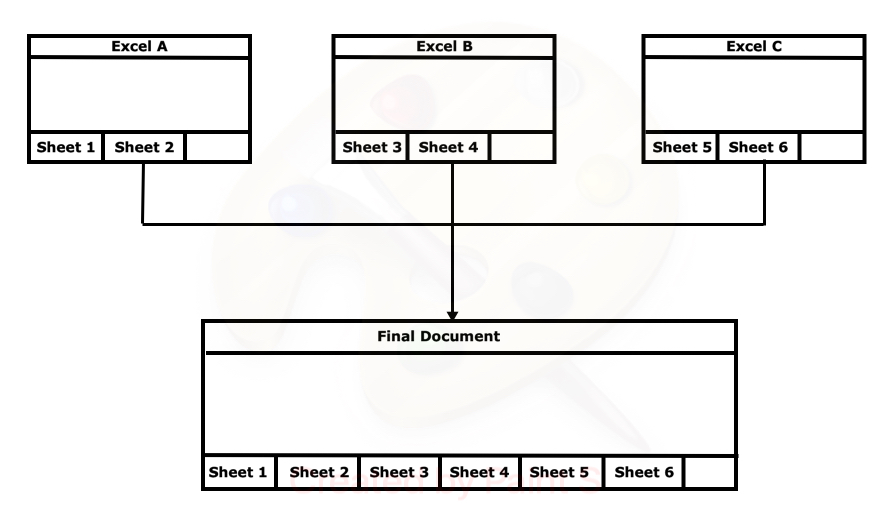
Fig 1: Combine Excel Files
The following sample code shows how to combine multiple Excel files into one using C#.
Combine Specific Worksheets of Excel Files using C#
The code above copies every worksheet from each source file. In many cases you only need selected worksheets. For example, if two workbooks contain sheets named Sales, Employees, and Expenses, you may want to copy only the Sales sheets into the destination workbook, as illustrated below.

Fig 2: Combine Specific Worksheets of Excel Files
The sample code below demonstrates how to combine specific worksheets from source files into a destination file using C#.
Merge Multiple Worksheets into One using C#
Sometimes you must consolidate data from several worksheets into a single summary sheet. For instance, you might have multiple sheets with product information that need to be merged into one overview sheet, as shown here:
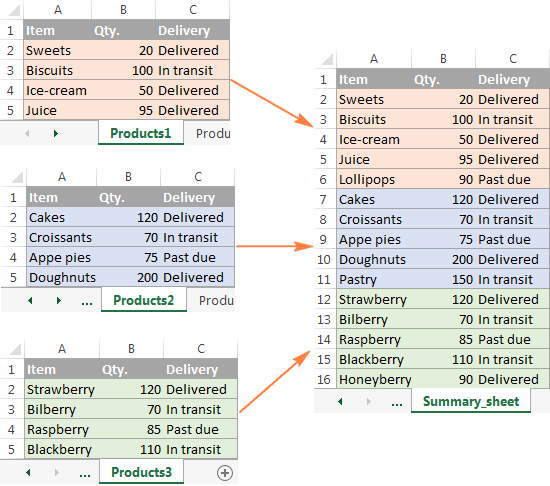
Fig 3: Merge Multiple Worksheets into One
The code snippet below shows how to copy data from several worksheets into one worksheet using C#.
Conclusion
This article demonstrated how to combine multiple Excel files into a single workbook using C#. You can copy all worksheets, select specific ones, or merge data from several sheets into one consolidated worksheet. See the documentation of Aspose.Cells for .NET for more details. If you have questions, ask in our Support Forum; we’ll respond within a few hours.